
Choosing an open source OpusClip alternative comes down to three practical engineering questions: whether the repository license allows commercial client work, how cleanly its computer-vision tracker reframes horizontal 16:9 dialogue into vertical 9:16 Shorts, and whether your local machine has an NVIDIA GPU or relies on CPU/browser rendering. Below is our verified November 2026 comparison across all five active self-hosted projects and the top three commercial SaaS clippers.
5 Open-Source AI Video Clippers Side-by-Side Matrix
Every project listed below has a public GitHub repository and exports watermark-free 9:16 MP4 files when self-hosted. Pay close attention to the License and 9:16 Reframing columns before deploying for an agency or team:
| Project | License | Commercial Agency Safe? | Deployment Stack | Speech-to-Text | Highlight Selection | 9:16 Reframing Mode | MCP / API |
|---|---|---|---|---|---|---|---|
OpenShorts (mutonby/openshorts) |
MIT | Yes | Docker Compose (:5175), CLI, Python |
faster-whisper / GPU Parakeet |
Gemini Flash or Local Ollama (LLM_BASE_URL) |
MediaPipe + YOLOv8 (Single, 2-Host Split, Screencast) |
Yes (/mcp + REST + CLI) |
SupoClip (FujiwaraChoki/supoclip) |
SupoClip Noncommercial | Own monetized channel OK; client/agency needs permission | Docker Compose (:3107: Next.js, FastAPI, Postgres, Redis) |
Local Whisper or AssemblyAI (99+ langs) | Gemini, OpenAI, Claude, OpenRouter, or Ollama |
Face-aware active-speaker tracking + manual studio crop | Yes (MCP + REST API) |
AutoClip (zhouxiaoka/autoclip) |
MIT | Yes | Docker Compose (:3000 / :8000) & macOS/Win Desktop |
OpenAI Whisper / SenseVoice | Local Ollama / LM Studio or Cloud BYOK |
Active-speaker 9:16 crop | Yes (MCP + FastAPI) |
ClipsAI (ClipsAI/clipsai) |
MIT | Yes | Python Library (pip install clipsai) |
WhisperX word-level timestamps |
Transcript topic segmentation (ClipFinder) |
Pyannote speaker diarization (resize(9,16)) |
Python SDK |
OpenReel Video (Augani/openreel-video) |
MIT | Yes | Browser WebCodecs + WebGPU (pnpm dev or web) |
SRT import + BYOK AI endpoint | User + AI Agent timeline cuts | Manual & keyframed 9:16 / 1:1 / 16:9 canvas | AI Agent driven |
How Open-Source 9:16 Vertical Cropping Compares in Practice
The hardest part of replacing OpusClip or Vizard is not speech transcription—faster-whisper and WhisperX already match or beat cloud transcription accuracy—it is camera framing when converting 1920x1080 widescreen footage into 1080x1920 vertical video.
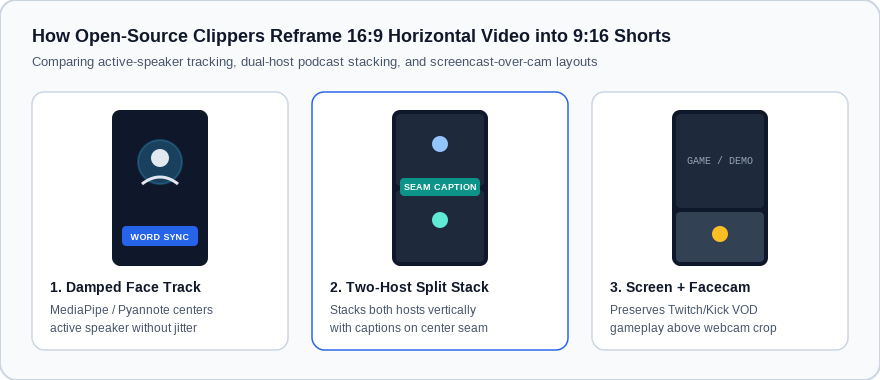
- Single-speaker interviews and talking-head vlogs: OpenShorts, SupoClip, AutoClip, and ClipsAI all track the active face or speaker smoothly. OpenShorts applies safe-zone damping so the vertical crop does not jitter when a speaker gestures, while ClipsAI uses
Pyannoteaudio diarization via Hugging Face to switch the crop to whichever person is speaking. - Two-person studio podcasts (wide shot): Naive center-cropping cuts off both hosts. OpenShorts stands out here with an automatic
SPLITlayout that stacks Speaker A above Speaker B in9:16and places burned-in captions right on the horizontal seam so neither face is covered. - Twitch, Kick, and software demo VODs: Stream recordings need both gameplay/screen context and the corner webcam. OpenShorts (
SCREENCASTlayout) and SupoClip (template framing + built-in clip studio) preserve top-and-bottom split regions without squashing the entire16:9screen into an unreadable strip.
Read our dedicated OpenShorts vs SupoClip Self-Hosted Review if you are deciding between the top two full-stack web dashboards.
Self-Hosted Clippers vs OpusClip, Vizard, and Klap (Cost & Lock-In)
Why are creators migrating from commercial SaaS clippers to self-hosted Docker stacks in 2026? Compare the ongoing constraints verified from public pricing tiers:
| Feature / Constraint | Self-Hosted Open Source (OpenShorts / AutoClip) | OpusClip (Cloud SaaS) | Vizard.ai (Cloud SaaS) | Klap (Cloud SaaS) |
|---|---|---|---|---|
| Monthly Subscription | $0 forever (you supply hardware + optional API key) | From $15/mo (Starter, 150 source mins) | From $14.50/mo billed yearly ($29 monthly) | From $14/mo billed yearly (100 clips) |
| Free Plan Limits | Unlimited minutes, 1080p, zero watermark | 60 mins/mo, watermarked,clips expire in 3 days | 60 mins/mo, capped at 720p, watermarked | Trial video only, watermarked |
| Data & NDA Privacy | 100% local disk (air-gapped possible with Ollama) | Uploaded to third-party cloud storage | Uploaded to third-party cloud storage | Uploaded to third-party cloud storage |
| API & Agent MCP | Included free in Docker container | Paid enterprise / API tiers only | Paid API tiers | Paid API tiers |
| Setup Effort | 10–15 min Docker Compose setup | Instant browser login | Instant browser login | Instant browser login |
Which Open-Source OpusClip Alternative Should You Install?
- For agencies, B2B podcasters, and commercial teams: Deploy OpenShorts (
MIT). You get commercial legal clarity, 2-speaker podcast split views, optional ElevenLabs 30+ language voice dubbing, and native MCP automation. - For solo creators wanting a visual clip studio & virality scores: Self-host SupoClip if your usage falls under personal or own-channel monetization—its 4-metric virality breakdown (Hook, Engagement, Value, Shareability) and reversible browser timeline editor feel closest to a commercial studio.
- For bilingual YouTube + Bilibili creators or offline Mac/PC users: Pick AutoClip (
MIT) for clean local-first Whisper/SenseVoice + Ollama clipping. - For Python backend builders: Install ClipsAI (
MIT) viapipto integrateClipFinderandPyannote9:16 resizing directly into custom media pipelines. - For zero-server browser editing: Launch OpenReel Video (
MIT) to cut, caption, and color-grade locally with WebGPU.
Not sure how your hardware handles each stack? Run your numbers in our Open Source AI Video Clipper Comparison or jump straight to the Self-Hosted AI Video Clipper Docker Guide to generate your .env file.
No hardware notes posted on this page yet—be the first to share what GPU/CPU and Whisper model you run.